@Traveller_guy_

How Does AI-Powered Digital Advertising Work?

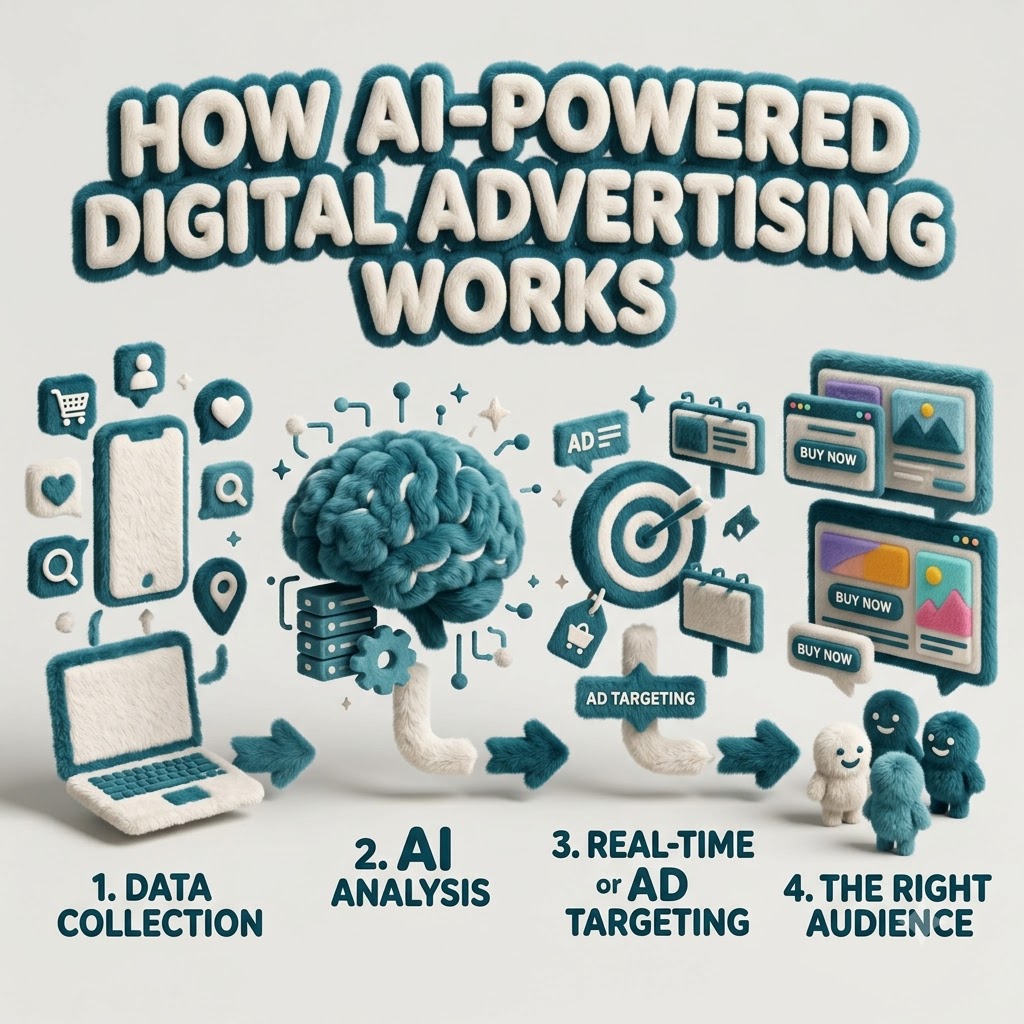
DIGITAL ADVERTISING AI-Powered Digital Advertising: What Businesses Need to Know in 2026 Artificial intelligence is changing how businesses plan, create, target, optimize, and measure digital advertising campaigns. The biggest opportunity is not simply using more automation—it is using AI to make better advertising decisions while keeping human strategy at the center. Quick Answer: AI-powered digital advertising uses data, machine learning, automation, predictive analysis, and creative tools to improve audience targeting, bidding, personalization, testing, campaign optimization, and performance measurement. Table of Contents How AI-Powered Digital Advertising Works Traditional vs AI-Powered Advertising How AI Is Changing Digital Advertising AI in Google, Meta & Social Advertising AI in E-Commerce Advertising Benefits of AI Advertising Challenges & Risks Practical AI Advertising Workflow Real-World Examples How Small Businesses Can Start Mistakes to Avoid Future of AI Advertising AI Advertising Framework Frequently Asked Questions How Does AI-Powered Digital Advertising Work? AI-powered advertising combines business data, customer signals, predictive models, automation, and continuous optimization to help advertisers make faster and more informed campaign decisions. 1. Data Collection Advertising systems use relevant campaign and audience signals to understand customer behavior, interests, conversions, and interactions. 2. Signal Analysis AI processes large amounts of information and identifies patterns that may be difficult to evaluate manually. 3. Prediction Predictive systems estimate which audiences, placements, messages, and actions are more likely to generate desired results. 4. Decision Making AI can recommend or automatically adjust targeting, bidding, placements, creative combinations, and campaign settings. 5. Ad Delivery Campaigns can dynamically deliver ads to relevant audiences and optimize delivery according to campaign objectives. 6. Measurement & Optimization Performance data feeds back into the system, allowing campaigns to be tested and improved continuously. Important: AI should work with responsible data practices. Businesses should respect privacy, consent, applicable laws, and platform policies when collecting and using customer information. Traditional Digital Advertising vs AI-Powered Advertising Area Traditional Approach AI-Powered Approach Audience Targeting More manual audience selection Automated audience discovery and prediction Bid Management Manual or rule-based adjustments Automated bidding based on campaign signals Creative Testing Limited combinations tested manually Multiple combinations can be tested at scale Personalization Often based on predefined segments Dynamic personalization using available signals Optimization Periodic manual optimization Continuous automated optimization Data Analysis Human-led analysis AI-assisted pattern and trend analysis Scalability Limited by manual workload Automation enables larger-scale management Human Role High operational involvement More focus on strategy, creativity and decision-making How AI Is Changing Digital Advertising 01 AI-Powered Audience Targeting AI can analyze audience signals and identify patterns that help advertisers reach people more likely to respond to a campaign. 02 Automated Bidding Automated bidding can adjust bids according to campaign objectives, available signals, competition, and expected performance. 03 AI-Generated Ad Copy AI tools can assist with headlines, descriptions, variations, hooks, calls to action, and campaign messaging. 04 AI-Generated Creative Ideas AI can support the development of creative concepts, visual directions, layouts, and multiple advertising variations. 05 Dynamic Personalization Advertising experiences can be adapted according to audience characteristics, behavior, intent, and campaign context. 06 Predictive Analytics AI can help identify trends and estimate potential outcomes from historical and real-time campaign signals. 07 Automated Campaign Optimization Campaign systems can automatically adjust delivery based on performance signals and defined objectives. 08 AI-Powered Ad Testing Multiple messages, audiences, formats, and creative combinations can be evaluated to discover stronger performers. 09 Programmatic Advertising AI can support automated media buying and real-time decisions across programmatic advertising environments. 10 Advertising Analytics AI-assisted analytics can make it easier to identify patterns, opportunities, problems, and performance changes. How AI Is Changing Google Ads, Meta Ads & Social Advertising Google Ads AI is increasingly involved in bidding, targeting, campaign optimization, audience signals, creative combinations, and performance forecasting. Meta Advertising AI helps advertisers discover audiences, optimize delivery, evaluate creative combinations, and improve campaign performance. Social Media Advertising AI can help businesses understand audience behavior, personalize advertising, test creative variations, and improve campaign delivery. For businesses: the goal should not be to hand everything over to automation. The strongest campaigns combine platform automation with clear positioning, strong creative, accurate tracking, and human strategic oversight. How AI Is Changing E-Commerce Advertising E-commerce businesses can use AI across the customer journey—from discovering potential buyers to promoting products and analyzing conversion performance. Product Promotion AI can help identify which products, audiences, and campaign combinations are most relevant. Product Recommendations Customer signals can support more relevant product discovery and personalized advertising experiences. Conversion Optimization Performance signals can help businesses identify opportunities to improve campaigns and customer journeys. Benefits of AI in Digital Advertising Better Targeting AI can help identify relevant audience patterns and improve campaign delivery. Faster Optimization Automated systems can process campaign signals much faster than manual workflows. Scalable Testing Businesses can test more creative and campaign combinations without increasing manual workload at the same rate. Improved Efficiency Automation can reduce repetitive campaign-management tasks. Useful Insights AI-assisted analysis can help marketers identify trends and opportunities hidden within campaign data. Personalized Experiences AI can support more relevant messaging and advertising experiences for different audience groups. Challenges and Risks of AI in Digital Advertising 01 Data Quality Poor or incomplete data can lead to poor recommendations and inaccurate optimization. 02 Over-Automation Businesses can lose strategic control if they rely on automation without understanding campaign objectives. 03 Privacy Concerns Businesses must handle customer data responsibly and follow applicable privacy requirements. 04 Creative Similarity Excessive dependence on AI-generated creative can make advertising look generic if human brand direction is missing. 05 Incorrect Interpretation AI-generated insights still require human review before important business decisions are made. 06 Platform Dependency Businesses should not depend entirely on one advertising platform or one automated system. Privacy and Ethical Issues in AI Advertising AI-powered advertising creates powerful opportunities, but responsible marketing should remain a priority. Businesses need to consider how customer information is collected, stored, processed, and used. Respect user privacy and applicable regulations. Use customer data responsibly. Follow advertising platform policies. Avoid misleading advertising claims. Review AI-generated content before publishing. Keep human oversight in important

How Does AI-Powered Digital Advertising Work? Read More »
Short-Form Content vs Long-Form Content: What Works Better?

Short-Form Content vs Long-Form Content: What Works Better? Quick Answer: Neither format is universally better. Short-form content wins attention, reach, and frequency. Long-form content wins depth, trust, search visibility, and education. The right choice depends on your audience, platform, objective, topic complexity, and funnel stage — not simply on word count. Ask ten marketers whether short-form or long-form content performs better and you may get ten different answers. One may point to a viral Reel that generated thousands of profile visits. Another may point to a detailed guide that continues bringing qualified visitors and leads month after month. Both examples can be successful because they solve different marketing problems. The real question is not which format is better. It is: which format is better for this audience, on this platform, for this objective, at this stage of the customer journey? This guide explains what short-form and long-form content are, how they differ, what each format does well, where each one has limitations, how they work across search and social media, and how businesses can use both as part of one content strategy. What Is Short-Form Content? Short-form content is content designed to be consumed quickly, usually within seconds or a few minutes. This can include short videos, brief social posts, quick tips, carousels, short emails, and other pieces designed around a single idea. There is no universal industry threshold for short-form content. What matters more than the exact length is the purpose: communicate one useful idea quickly, capture attention early, and make the content easy to consume. Common Characteristics of Short-Form Content One Clear Idea Short-form content usually focuses on one idea, lesson, tip, question, or takeaway. Fast Hook The key message is introduced quickly so the audience immediately understands why the content matters. Mobile First Short videos, social posts, and carousels are designed around quick mobile consumption. Easy to Share Useful short-form content can be saved, shared, commented on, or repurposed across platforms. Frequent Publishing Short-form makes it easier for businesses to maintain a consistent publishing rhythm. Quick Feedback Performance data can help marketers identify which ideas and messages resonate with audiences. Short-Form Content Examples Instagram Reels and Stories YouTube Shorts TikTok videos Short LinkedIn posts Quick tips and micro-tutorials Industry insights and short opinions Memes and relatable industry content Product teasers and promotional clips Short email updates Instagram and LinkedIn carousels When Short-Form Content Is Most Useful Short-form content works particularly well when a business needs to capture attention quickly, communicate a simple idea, reach mobile-first audiences, test messaging, or build awareness through social platforms. What Is Long-Form Content? Long-form content is content that goes deep enough to properly answer a complex question or support a considered decision. It can include detailed articles, comprehensive guides, case studies, research reports, webinars, long videos, and educational resources. A 900-word article that completely solves a specific problem can be more valuable than a 3,000-word article filled with repetition. Length is the packaging; depth and usefulness are the real product. Common Characteristics of Long-Form Content Topic Depth Covers a subject thoroughly, including important details, context, exceptions, and practical examples. Multiple Questions A strong resource can answer several related questions in one place. Research & Evidence Long-form content often uses research, examples, original insights, frameworks, or supporting data. Expertise Detailed resources can demonstrate genuine knowledge and help establish authority around a topic. Long-Form Content Examples Comprehensive blog posts and pillar pages In-depth guides and tutorials Case studies and customer stories White papers and research reports Ebooks and downloadable resources Long-form YouTube videos Webinars and podcasts Detailed product and service pages Original research and data studies When Long-Form Content Is Most Useful Long-form content earns its place when a topic is complex, the customer needs detailed information before making a decision, search intent demands a complete answer, or a business wants to create an evergreen resource that continues generating value over time. Benefits of Short-Form Content Fast Consumption Audiences can understand the main message quickly, reducing the commitment required to engage. Easy Distribution One short asset can often be adapted for several social platforms with relatively little additional work. Social Compatibility Short-form content naturally fits recommendation feeds and mobile-first platforms. Rapid Feedback Engagement data can quickly reveal which ideas and messages are connecting with an audience. Awareness Short content can help brands reach people who have never interacted with them before. Repurposing Long-form research can be transformed into multiple short-form pieces, extending its reach. Limitations of Short-Form Content Limited depth: Complex topics can become oversimplified. Less room for context: Exceptions and trade-offs are harder to explain. Complex subjects are difficult: Technical and nuanced topics often require more space. Shorter content lifespan: Feed-based content can lose visibility quickly. Publishing pressure: Maintaining consistency can require significant effort. May not satisfy complex intent: A major purchasing decision usually requires more information. Benefits of Long-Form Content Greater Depth Businesses can properly explain complex subjects and cover the areas competitors may overlook. Educational Value Detailed resources are ideal for frameworks, processes, comparisons, and tutorials. Topical Authority Connected long-form resources can help establish a clear subject area across a website. Search Visibility Detailed content can address broader and more specific search intents when the depth matches the query. Lead Generation Guides, case studies, service pages, and comparisons can support users who are closer to conversion. Evergreen Value A genuinely useful resource can continue attracting visitors, links, and leads for months or years. Limitations of Long-Form Content Higher production effort: Research, writing, editing, design, and verification take time. Longer research cycle: Thorough content requires careful preparation. Greater editing demands: Weak structure becomes more obvious as content gets longer. Risk of filler: Writing simply to reach a word count can reduce quality. Readability challenges: Dense paragraphs can lose readers. Weak introductions: A poor opening can lose the reader before the useful content begins. No automatic ranking guarantee: Long content does not automatically rank or convert. Depth matters more than arbitrary word count. A focused article that fully answers a question can

Short-Form Content vs Long-Form Content: What Works Better? Read More »

Google Ads for Beginners: A Simple Guide to Getting Started

Google Ads for Beginners: A Simple Guide to Getting Started Open a Google Ads account for the first time and it can feel like stepping into a cockpit — campaign types, bidding strategies, match types, conversion goals, all asking for a decision before you’ve even written your first ad. It’s no surprise a lot of beginners either freeze or just click through the defaults and hope for the best. The good news is that the core idea behind Google Ads is actually simple, even if the interface isn’t. This guide walks through it step by step — what Google Ads is, how it works, and how to set up a first campaign without getting lost in features you don’t need yet. Quick Answer: Google Ads is Google’s advertising platform that lets businesses promote products and services across eligible Google properties and partner placements. Businesses choose a goal, target relevant keywords or audiences, set a budget, and generally pay when someone interacts with their ad — with exact targeting options and formats depending on the campaign type chosen. What Is Google Ads? Google Ads is paid advertising — businesses pay to appear in front of people, rather than earning that visibility for free the way organic search results do. Ads can appear on Google’s search results, and depending on the campaign type, across other Google properties and partner placements as well. The core difference is simple: organic search visibility is earned through SEO and isn’t paid for directly, while paid search visibility is bought, typically with advertisers paying when someone interacts with their ad in a qualifying way. A bakery might show up organically for “best sourdough recipe” after months of content work, while a Google Ads campaign for “bakery near me” could start showing an ad the same day it’s launched. How Does Google Ads Work? At a basic level, the process looks like this: a business creates a campaign, chooses a goal, selects relevant targeting, creates ads, and sets a budget and bidding approach. When someone’s search or browsing matches an opportunity, Google evaluates eligible ads and may show one to that person. If they click or take another desired action, the business measures the result and adjusts the campaign accordingly. Behind this sits something often called the ad auction — but it’s not simply a matter of the highest bidder automatically winning every time. Relevance, ad quality, your bid, and the context of the search all play a role in which ads actually get shown and how they perform. Why Do Businesses Use Google Ads? Google Ads lets businesses reach people who are actively searching, often faster than waiting for organic rankings to build. It offers real control over targeting specific audiences or locations, setting and adjusting a budget, and measuring exactly what’s happening with the campaign. It’s useful for generating leads, driving sales, promoting specific products or services, and quickly testing different offers and messaging. It’s not automatically the right fit for every business, though — it tends to work best when there’s genuine search demand for what you offer and a website ready to convert the traffic it sends. Google Ads vs SEO: What’s the Difference? Factor Google Ads SEO Traffic Paid Organic Speed Can provide visibility quickly Usually takes longer Cost Model Advertising spend Investment in SEO work Control More direct control over campaigns Less direct control over rankings Long-Term Value Depends on ongoing campaigns Can build lasting organic visibility Best For Paid visibility and targeted campaigns Long-term organic growth Both can be genuinely useful, and neither is automatically better for every business — many businesses end up using both for different reasons. What You Need Before Starting Google Ads Before opening an account, it helps to have a clear business goal, a defined target audience, a website or relevant destination page ready to receive traffic, a clear product or service to promote, a realistic budget, defined conversion goals, and at least a basic sense of what your customers are actually searching for. Sending paid traffic to an unprepared website — slow, unclear, or missing a way to contact you — tends to waste budget regardless of how well the campaign itself is built. Step 1: Create Your Google Ads Account Setting up an account generally involves signing up with a Google account, providing basic business information, and working through Google’s setup flow. The exact interface and steps can change over time, so it’s worth checking Google’s current official setup guide rather than relying on older instructions. Whatever the current flow looks like, take time to review the account settings carefully — location, language, and billing details in particular — before launching your first campaign. Step 2: Choose the Right Campaign Goal Google Ads asks you to pick a goal early on — common options include leads, sales, website traffic, and awareness or reach, with app-related goals available for relevant businesses. The right goal depends on your business: a local service business often cares most about leads, an ecommerce store typically focuses on sales, and a newer brand might genuinely benefit from an awareness-focused goal depending on its specific objective. No single goal is universally correct — pick the one that actually matches what you’re trying to achieve. Step 3: Choose a Google Ads Campaign Type Common campaign types include Search, Display, Shopping, Video, App, and Performance Max, each generally designed for a different purpose. Search: Targets people actively typing queries. Display: Shows visual ads across a network of sites. Shopping: Showcases products. Video: Runs video advertising across relevant video placements. App: Supports businesses promoting applications. Performance Max: Helps advertisers reach customers across multiple Google channels through a unified campaign. For beginners, Search campaigns are often easier to understand at first, since they’re built around capturing existing search demand from people already looking for something specific. That doesn’t mean Search is always the best choice — an ecommerce store might get more value from Shopping ads, for instance. Step 4: Choose the Right Keywords

Google Ads for Beginners: A Simple Guide to Getting Started Read More »

Content marketing vs performance marketing

Content Marketing vs Performance Marketing Every business eventually faces the fork in the road. One path is to build long-term reach with blogs, videos, guides and search rankings that keep drawing people in. The other path is to run paid advertising that puts your offer in front of customers quickly and tells you how much each lead costs. So the real question behind content marketing versus performance marketing is this: should your business invest in content marketing, performance marketing or both? In this guide, you will learn what each strategy really means, how they differ in cost, speed, return on investment and measurement, which businesses should lean toward which approach, how they work together and how to build a combined plan step by step. What Is Content Marketing? Content marketing is a strategy that focuses on creating and sharing relevant content to attract and engage a specific audience. Instead of pushing sales messages directly, this approach builds relationships by offering value. The content earns attention by answering questions, solving problems and building trust—often before the buyer is even ready to talk to sales. How It Works Imagine someone searches for “how to choose accounting software for a business.” Your blog post appears in the search results, offers an answer and gently shows how your product helps. The person reads it, finds value and comes back later. They may sign up for your email list, continue learning from your content and eventually reach out to ask about your solution. You did not pay for that click. You invested time or money to create content that keeps working over time—like an asset that can continue generating leads. Common Content Marketing Formats Blog posts and how-to guides Case studies and customer stories Videos and YouTube tutorials Social media content Email newsletters and email sequences Whitepapers and e-books Webinars, templates, calculators and other educational tools Where It Sits in the Marketing Funnel The marketing funnel shows the journey a buyer takes—from hearing about your brand to becoming a customer. Content marketing plays a role at every stage. It is most powerful at the top and middle. At the top of the funnel, content helps people recognize a problem—like “What is wrong with my bookkeeping?” In the middle, it supports decision-making—like “Which software fits my needs?” Benefits and Limitations Benefits: It drives compounding traffic over time. It builds brand authority and trust. It can lower the cost per lead over the long run. It supports customer retention by continuing to provide value after the sale. Limitations: It is slow. Building rankings and results can take months. It can be difficult to track exactly which content leads to a sale. Generic or low-quality content may produce little or no meaningful results. Content marketing works best when you are patient, consistent and focused on value. What Is Performance Marketing? Performance marketing is a paid, results-focused method where you pay for measurable actions such as clicks, leads, sales, app installs or calls. Every campaign is linked to a goal, and spending is judged by the results it creates. Main Channels Paid Search / Google Ads: Your ad appears when someone searches for a relevant keyword. Social Media Advertising: Paid advertising across platforms such as Facebook, Instagram, LinkedIn and YouTube. Display Advertising: Banner and visual ads distributed across websites and apps. Retargeting: Ads displayed to people who have already visited your website. Affiliate Marketing: Partners are paid when they generate a sale or lead. The Actions and Numbers That Matter Performance marketing relies on actions such as clicks, leads, purchases, registrations, calls and conversions. A conversion is any desired action a visitor takes, such as completing a form, making a purchase or booking a call. Content Marketing vs Performance Marketing: Quick Comparison Factor Content Marketing Performance Marketing Main Goal Build visibility, trust and long-term audience relationships. Generate measurable actions such as leads, sales and sign-ups. Traffic Mainly organic and owned traffic. Mainly paid traffic. Speed Usually slower to produce significant results. Can generate traffic and leads quickly. Cost Investment in content creation, strategy and distribution. Ongoing advertising expenditure. Measurement Traffic, rankings, engagement, leads and assisted conversions. Clicks, conversions, CPA, CPL and ROAS. Long-Term Value Can continue producing value after publication. Results generally depend on continued advertising spend. Best For SEO, education, authority and long-term growth. Immediate demand generation and measurable acquisition. What Is the Difference Between Content Marketing and Performance Marketing? Content marketing builds attention slowly by sharing content that people want to read, watch or use. It grows visibility naturally over time. Performance marketing gets attention quickly by using paid ads. It focuses on results such as getting leads, sales or sign-ups. 1. Short-Term vs Long-Term Results A bakery that starts a festive hamper can use Instagram and Google Ads right now and begin receiving orders quickly. A B2B accounting firm that writes a GST compliance guide may not see the benefit immediately, yet that guide can continue to bring relevant visitors and enquiries over a much longer period. 2. Organic vs Paid Traffic Organic traffic comes from sources such as search results and shares. Paid traffic comes from advertisements. Organic traffic can become more cost-efficient over time but generally grows more slowly. Paid traffic can be immediate but normally stops when the budget ends. 3. Brand Building vs Direct Response Content tells people who you are and why you understand what they need. Performance ads are designed to trigger an action such as a call, purchase or sign-up. Strong brands usually use both because people are more likely to act when they recognize and trust a business. 4. Investment Model Content requires an investment in writers, designers, strategy and distribution. Once created, successful content can continue producing value. Performance marketing is more of a pay-as-you-go model. You continue funding the campaigns to continue receiving paid traffic. 5. Audience Targeting Content targets people through search intent, which is what a person is trying to find or solve. Paid campaigns can also target demographics, location, interests, behavior, devices

Content marketing vs performance marketing Read More »

“Why Your Email Subscribers Aren’t Buying—and How to Fix Your Funnel”

Why Your Email Subscribers Aren’t Buying—and How to Fix Your Funnel A subscriber is an audience asset. A customer is a business outcome. The funnel in between decides which one you get. A subscriber is an audience asset. A customer is a business outcome. The funnel in between decides which one you get. Why Aren’t My Email Subscribers Buying? Having subscribers does not automatically mean having customers. People may join your list because they want information, a free resource, a discount, or simply because they are interested in your brand. Your job is to move those subscribers through a structured journey that builds trust, creates relevance, demonstrates value, removes objections, and eventually gives them a clear reason to buy. Having Subscribers Is Not the Same as Having Buyers A large email list can look impressive, but subscriber count alone does not tell you whether your email marketing is working. What matters is whether your subscribers are moving from awareness to consideration and eventually to purchase. The Email Funnel: Where Subscribers Become Customers A strong email funnel connects the right message with the right person at the right stage of the customer journey. Awareness Introduce your brand and establish relevance. Trust Educate subscribers and demonstrate expertise. Consideration Show how your solution addresses their problem. Purchase Present a clear offer and make buying easy. 10 Reasons Your Email Subscribers Aren’t Buying 01 Your Subscribers Never Had Strong Purchase Intent Not every subscriber joins your list with the intention to buy. Some are simply researching, downloading resources, comparing options, or exploring your content. 02 Your Emails Are Too Generic Generic emails make it difficult for subscribers to see why your offer is relevant to them. Strong email marketing connects the message to a specific problem, need, or goal. 03 Your Segmentation Is Too Weak Different subscribers can have different needs. Segmenting audiences based on behaviour, interests, customer stage, or engagement can make messages more relevant. 04 You Are Selling Too Early Asking someone to buy before establishing enough trust or demonstrating value can create resistance. 05 You Are Not Selling Clearly Enough Subscribers need to understand what you offer, who it is for, why it matters, and what action they should take. 06 Your Offer Is Not Strong Enough Even a well-written email cannot compensate for an unclear, weak, or poorly positioned offer. 07 Your Emails Get Clicks but the Landing Page Loses the Sale The email and landing page should feel like one continuous experience. 08 You Are Sending Emails at the Wrong Stage of the Customer Journey Match your communication with the subscriber’s stage and behaviour. 09 There Is Too Much Friction Between Click and Purchase Complicated forms, unclear pricing, unnecessary steps, slow pages, or confusing checkout experiences can stop interested subscribers from completing the purchase. 10 You Are Measuring the Wrong Metrics Open rates and clicks can provide useful signals, but they do not tell the entire story. Metrics That Matter To understand where your funnel is performing and where it is leaking, monitor metrics across the complete subscriber journey. Open Rate Helps indicate whether subject lines and sender recognition are encouraging subscribers to open emails. Click-Through Rate Shows whether the email content and call to action encourage subscribers to continue the journey. Conversion Rate Measures how many users complete the desired action after interacting with your email. Revenue Per Subscriber Helps connect email marketing activity to actual business outcomes. How to Find the Leak in Your Email Funnel Start by mapping the complete journey from subscription to purchase. Then compare performance at every stage. Stage What to Check Possible Problem Signup Where subscribers come from Low purchase intent Welcome Initial engagement Weak first impression Nurture Content engagement Generic messaging Offer Clicks and conversions Weak value proposition Landing Page Page conversion Message mismatch or friction Checkout Completed purchases Too many steps How to Fix an Email Funnel That Isn’t Converting 01 Improve Your Lead Source Attract subscribers who are more closely aligned with your products, services, and target audience. 02 Create a Strong Welcome Sequence Set expectations, introduce your brand, deliver value, and guide new subscribers toward the next logical step. 03 Segment Your Audience Use subscriber behaviour, interests, engagement, and customer stage to create more relevant communication. 04 Build Trust Before Selling Use educational content, useful insights, proof, and consistent communication to strengthen trust. 05 Make Your Offer Clear Clearly communicate what the customer gets, who it is for, and why the offer is valuable. 06 Use Strong Calls to Action Give subscribers one clear next step instead of overwhelming them with multiple competing actions. 07 Improve Your Landing Page Make sure the landing page continues the promise, message, and experience created by the email. 08 Reduce Conversion Friction Simplify forms, checkout steps, navigation, and other barriers that can stop a purchase. 09 Use Behaviour-Based Automation Trigger different messages based on actions such as clicks, downloads, purchases, or inactivity. 10 Test Your Emails Test subject lines, messaging, calls to action, timing, offers, and layouts. 11 Connect Email With the Rest of Your Marketing Email works better when it supports your SEO, content, social media, advertising, and website experience. 12 Measure Business Results Connect campaigns with leads, purchases, revenue, and customer value. How Many Emails Should Be in a Welcome Sequence? There is no single number that works for every business. The sequence should be long enough to introduce the brand, establish value, build trust, and guide the subscriber toward the next step without becoming repetitive. Email Purpose Email 1 Welcome and set expectations Email 2 Provide useful value Email 3 Address a key problem Email 4 Build trust and demonstrate expertise Email 5 Introduce a relevant offer Email 6 Handle objections and encourage action How to Write Emails That Actually Convert Conversion-focused emails are not simply sales messages. They connect a subscriber’s problem with a useful solution and make the next action clear. Focus on one main idea per email. Use language that speaks directly to the audience’s

“Why Your Email Subscribers Aren’t Buying—and How to Fix Your Funnel” Read More »

How to Build a Content Strategy That Works Across Google, AI Search, and Social Media

How to Build a Modern Content Strategy in 2026 Picture this: You publish a well-researched blog post. You wait for Google to send traffic. A week passes. Nothing. Meanwhile, a competitor’s messy TikTok about the same topic gets 40,000 views, and ChatGPT recommends their brand when someone asks about your category. That’s not bad luck. That’s a strategy that only works for one channel in a world where people discover information across many. In 2026, discovery is fragmented. Someone might first see your brand on LinkedIn, then ask ChatGPT for recommendations, then Google your name to verify you’re real. If you’re only optimized for one of those moments, you’re invisible for the rest. This guide is about fixing that. Not by creating three separate strategies, but by building one content system that gets discovered, understood, and shared everywhere your audience looks. What Is a Modern Content Strategy? A content strategy is the plan that decides what content you make, who it’s for, where it lives, and what it’s supposed to achieve. It’s the difference between publishing because you feel like you should and publishing because you know exactly what result you’re chasing. People often mix up content creation, content marketing, content strategy, and content distribution. They’re related, but they’re not the same thing: Content creation — making the thing (writing the post, recording the video). Content marketing — using content to attract and convert an audience. Content strategy — deciding what to create, for whom, and why, before you start. Content distribution — getting that content in front of the right people on the right platforms. Most businesses skip strategy and jump straight to creation. That’s why they burn out. Without a strategy, every piece of content is a guess. Why One Content Strategy Must Work Across Multiple Channels Your audience doesn’t live on one platform. Someone might find you through Google, verify you through ChatGPT, and follow you on Instagram. That journey is normal now. The businesses that win aren’t running three separate content operations. They’re building one core body of work and adapting it for each discovery surface. Stop treating each platform like its own separate content universe. A strong pillar article can feed a LinkedIn post, a short video script, an email newsletter, and an AI-search-friendly FAQ section — all from the same research and expertise. How Google Search Is Changing Content Strategy Google still matters. It just doesn’t work the way it did five years ago. Three shifts are reshaping what gets visibility: Experience is now part of the quality equation. Google’s Quality Rater Guidelines added a second “E” — Experience — to the old E-A-T framework. First-hand knowledge and original perspective carry weight that generic summaries don’t. Topical authority beats isolated posts. The algorithm evaluates content clusters, not just individual pages. Depth around a subject is the signal. AI Overviews are in the results. Google’s AI-generated summaries are changing how users interact with traditional search results. The practical takeaway: stop writing for a single keyword. Write to become the most useful, specific, and trustworthy source on a topic. That’s what both traditional rankings and AI systems reward. How AI Search Is Changing Content Discovery AI search tools — ChatGPT, Perplexity, Gemini, Google’s AI Mode — don’t show a list of links. They read, synthesize, and answer. If your content isn’t structured for that process, you don’t get mentioned. These systems look for content that is: Clear and direct in its answers Well structured with descriptive headings Factually accurate and sourced where needed Context-rich with specific examples Consistent in how it names entities Supported by evidence and first-hand experience One thing the data makes clear: YouTube mentions show the strongest correlation with AI visibility across platforms — stronger than traditional authority metrics like domain rating. When brands appear in video titles, transcripts, and descriptions, AI systems pick them up. That doesn’t mean every brand needs a YouTube channel tomorrow. It means video content and transcript-rich pages are becoming part of the discoverability layer, not just a nice-to-have. What Is AEO and Why Does It Matter? Answer Engine Optimization (AEO) is the practice of structuring your content so AI tools can find it, understand it, and use it as a direct answer. Think of it as SEO’s cousin. SEO tries to get you ranked in a list. AEO tries to get you quoted in the answer. The core moves are simple: Answer the question in the first two sentences. Use question-based headings. Add FAQ sections where they’re genuinely useful. Define key concepts clearly. Keep punctuation and formatting clean. AEO doesn’t replace SEO. It extends it. The same content can rank in traditional results and get cited in AI answers if it’s structured for both. What Is GEO (Generative Engine Optimization)? GEO is the broader practice of making your content more useful for generative AI systems — the models behind ChatGPT, Gemini, Claude, and AI Overviews. Where AEO focuses on answer structure, GEO focuses on the qualities that make a source worth citing: Information clarity — no jargon soup, no vague claims. Authority signals — credentials, experience, and evidence where relevant. Context — information that helps a machine understand what you’re saying. Original insight — something the model can’t get from 50 other pages. Factual accuracy — because generative systems pull from reliable sources. Entity clarity — naming your brand, products, and key people consistently. Citability — writing in a way that’s easy to quote and reference. No one can promise you a guaranteed spot in AI answers. These systems change constantly. But content that’s clear, accurate, specific, and well-organized consistently performs better in generative environments than content that’s vague or thin. How Social Media Fits Into the Modern Search Journey Social media isn’t just a distribution channel anymore. It’s a search engine for a growing chunk of the population. The numbers tell the story. Social media search use grew from 1% in 2021 to 21% in 2025. Among Gen Z, 41% turn to social platforms first

How to Build a Content Strategy That Works Across Google, AI Search, and Social Media Read More »

What Is Google Ads for E-commerce?

Google Ads for E-commerce: A Complete Guide to Growing Online Store Sales What Is Google Ads for E-commerce? Direct answer: Google Ads for e-commerce is a paid advertising system that lets online stores promote products across Google Search, Shopping, YouTube, Display and Discover. Product data, keywords, audience signals and creative assets determine where ads appear. Businesses typically pay per click or per thousand impressions, and performance is measured through conversion tracking. In practice, e-commerce advertising on Google looks different from lead-generation advertising. A service business might chase form fills. An online store chases completed purchases, average order value, and repeat customers. Three components work together: Google Ads — where campaigns, budgets and bids live. Google Merchant Center — where your product catalogue is stored, validated and matched to shopping surfaces. Your product feed and landing pages — the raw material Google uses to decide whether to show your ad, and what happens after the click. If any one of those three is weak, the other two cannot compensate. A perfect campaign structure cannot rescue a feed with missing prices, and a clean feed cannot rescue a product page that loads slowly on mobile. E-commerce ads can appear on the Google Search results page, the Shopping tab, Google Images, YouTube, Gmail, Discover, and across millions of partner websites and apps. Most e-commerce advertisers pay on a cost-per-click (CPC) basis, though impression-based and conversion-based models exist depending on the campaign type. A successful e-commerce advertising system connects product data, campaign strategy, accurate tracking and a strong shopping experience. Google can bring the visitor, but the store still has to convert that visitor into a customer. How Does Google Ads Work for E-commerce Businesses? The mechanics are less mysterious than they look. Here is the sequence from setup to sale. Product and business setup. You create a Google Ads account and a Merchant Center account, and connect them. Product data. Your product catalogue is uploaded — either by feed, API, or platform integration. Feed processing. Google reviews titles, descriptions, prices, availability, images and identifiers, then approves or disapproves each item. Campaign creation. You choose a campaign type, set a budget, and define conversion goals. Targeting and signals. Keywords, audiences, demographics, device and location settings narrow who sees the ad. Bidding. You set a strategy — manual or automated — that tells Google how much a click or conversion is worth. The ad auction. When someone searches, Google runs a near-instant auction combining your bid, ad quality, relevance, landing page experience and expected impact. Ad serving. Winning ads appear in the position and format Google determines is most relevant. The click. A shopper clicks through. You pay the CPC for most campaign types. Landing. The shopper arrives on a product or category page. This is where most of the outcome is decided. Conversion. The shopper adds to cart and purchases — tracked by your conversion tag. Measurement and optimization. You review search terms, product performance, ROAS and margins, then adjust. Notice that steps 10 to 12 are not really Google’s responsibility. Google delivers the traffic. Your page, pricing, shipping terms and checkout decide what happens next. Advertisers who forget this tend to blame the platform for a website problem. Why Should E-commerce Businesses Use Google Ads? The case for paid search in e-commerce rests on intent. Someone searching for a specific product is further along than someone scrolling a social feed. That proximity to purchase is why paid search often produces the most measurable return in a retail media mix. High-intent traffic. You appear at the moment of consideration. Product visibility. Shopping and Performance Max placements show the actual product image and price, not just text. Fast testing. You can validate demand for a new product in days rather than waiting months for organic rankings. Measurable performance. Clicks, revenue and ROAS are trackable to the product level. Remarketing. You can re-engage people who viewed a product but did not buy. Scalability. Budgets can be increased on demand when performance supports it. Revenue attribution. You can see which products and queries actually generate sales. Data-driven decisions. Performance data informs pricing, merchandising and inventory planning. When Google Ads may not be the right first move: very thin margins, products with no existing search demand, a website that converts poorly on mobile, or a business without the capacity to fulfil a sudden increase in orders. In those cases, fixing the fundamentals first usually costs less than advertising into a leaky funnel. Types of Google Ads Campaigns for E-commerce Not every campaign type deserves the same share of your budget. Each one solves a different problem. 1. Shopping Ads Shopping ads pull product data from Merchant Center and display an image, title, price and store name. There is no keyword to write — Google matches your feed against search queries. Advantages: Visual, price-transparent, strong commercial intent, product-level reporting. Limitations: Feed quality drives everything; limited control over exact query matching. Example: A furniture retailer showing a specific sofa at ₹24,999 with free delivery. 2. Performance Max Performance Max is a goal-based campaign that runs across Search, Shopping, YouTube, Display, Discover, Gmail and Maps from a single campaign. You supply product feeds, creative assets and audience signals, and automation decides placement and bidding. Best use case: Advertisers with solid conversion data and enough creative assets who want broad reach. Advantages: Wide coverage, less manual management, works across the full Google inventory. Limitations: Reduced granular control, limited visibility into where spend goes, and it can absorb budget that Shopping or Search would use more efficiently. Example: A supplements brand using one Performance Max campaign to reach buyers across YouTube, Discover and Shopping simultaneously. Performance Max is not automatically superior. It performs best when conversion tracking is accurate and the account has enough data for automation to learn from. 3. Search Campaigns Text ads triggered by keywords. You control the message, the keywords and the landing page. Best use case: Brand terms, category terms, competitor terms and high-intent product queries. Advantages:

What Is Google Ads for E-commerce? Read More »

Why Short-Form Video Is Still Dominating Social Media in 2026

Why Short-Form Video Is Still Dominating Social Media in 2026 A practical look at why short-form video continues to shape social media, how businesses can use it, and what makes short videos effective in 2026. Open Instagram for a few minutes and you will probably see Reels. Check YouTube and you will find Shorts. Browse Facebook and short videos appear almost immediately. Across social media platforms, short-form video has become one of the most visible forms of digital content. Creators use it to entertain and educate, while businesses use it to introduce products, explain services and connect with potential customers. In 2026, short-form video is no longer simply a passing trend. It has become an important part of how people discover information, interact with brands and decide what content deserves their attention. But why does short-form video continue to perform so strongly? More importantly, how can businesses use it effectively? What Is Short-Form Video? Short-form video refers to video content created to communicate an idea, story, message or piece of information within a relatively short period of time. The ideal length can vary depending on the platform, audience and subject. Instagram Reels, YouTube Shorts, TikTok videos and Facebook Reels are all examples of short-form content. However, the real purpose is not simply to make a video short. The goal is to communicate something valuable quickly while maintaining the viewer’s attention. Why Is Short-Form Video Still So Popular in 2026? People Have Limited Attention People are exposed to a huge amount of information every day. Social media feeds move quickly and users often decide within seconds whether something is worth watching. Short-form video fits naturally into this environment because it can communicate a clear idea without requiring a large time commitment. Short Videos Are Easy to Consume A short video can be watched during a break, while travelling, waiting for someone or simply scrolling through a social platform. This makes short-form content particularly suitable for mobile-first audiences. Social Platforms Prioritize Video Discovery Major social platforms have invested heavily in video discovery and recommendation systems. This allows users to discover content from creators and businesses they do not already follow. For businesses, this creates an opportunity to reach new audiences beyond their existing follower base. Short-Form Video Encourages Higher Content Consumption One short video can quickly lead to another. Users can move between different topics without leaving the platform. This creates more opportunities for creators and businesses to communicate ideas and build familiarity with their audience. Short-Form Video Is Shareable Useful, entertaining and relatable videos are easy to share with friends, send through messages or repost across social platforms. When content solves a problem or communicates something people recognize, sharing can become a natural part of its distribution. Creators Have Made Video More Relatable Social media video is no longer limited to highly polished advertising. Tutorials, opinions, demonstrations, behind-the-scenes content and everyday experiences can all attract attention. This has made audiences more comfortable with authentic and practical video content. AI Is Making Video Creation Easier AI-powered tools can assist with brainstorming, scripts, captions, subtitles, editing and content repurposing. This can reduce the amount of time required to move from an idea to a finished video, allowing marketers to experiment with more content formats. Videos Support Social Commerce Short videos can demonstrate how a product looks, how it works and why someone might need it. For ecommerce businesses, this makes video useful for introducing products and helping potential customers understand their value. Short-Form Video Works Across Industries Short-form video is not limited to entertainment brands. Almost every industry can adapt the format to its audience. Restaurants can showcase food and customer experiences. Healthcare businesses can share educational information. Real estate companies can highlight properties. Education brands can explain difficult concepts. Digital agencies can share marketing insights. Ecommerce brands can demonstrate products. Local businesses can introduce their team and services. Major Platforms for Short-Form Video in 2026 Instagram Reels Instagram Reels remain an important format for creators, brands and businesses. Reels can support discovery, engagement, community building and product awareness. YouTube Shorts YouTube Shorts provide businesses with another way to reach people through short educational, entertaining and informational videos. TikTok TikTok continues to be strongly associated with short-form video, trends, storytelling and creator-led content. Its discovery-focused experience makes it valuable for many audiences. Facebook Reels Facebook Reels can be useful for businesses targeting communities and audiences that already use Facebook regularly. Short-Form Video vs Long-Form Video Short-form and long-form video should not necessarily be treated as competitors. They can serve different purposes within the same content strategy. Short-Form Video Long-Form Video Designed for quick consumption Designed for deeper engagement Strong for discovery Strong for detailed education Quick tips and ideas Detailed tutorials and explanations Easy to consume on mobile Usually requires more attention Excellent for awareness Useful for deeper consideration A strong content strategy can use both formats. For example, a business can create one detailed video and then turn its strongest ideas into several short-form videos. How Can Businesses Use Short-Form Video in 2026? Businesses should not create short videos simply because everyone else is doing it. Each video should have a clear purpose. Build Brand Awareness: Introduce your business, team, products, services and values in a way that new audiences can understand quickly. Educate Customers: Answer common questions, explain processes and provide useful information related to your industry. Show Products: Demonstrate features, benefits and real-world applications. Build Trust: Show behind-the-scenes activity, customer experiences and the people behind the business. Generate Leads: Use relevant calls to action that encourage viewers to visit your website, contact page or other business destination. Types of Short-Form Videos That Work for Businesses Businesses can experiment with different formats rather than publishing the same type of promotional video repeatedly. Quick educational tips How-to videos Frequently asked questions Product demonstrations Behind-the-scenes content Customer stories Industry insights Before-and-after explanations Myth versus fact videos Short case studies Founder or team videos Common mistakes and solutions What Makes a Short-Form Video

Why Short-Form Video Is Still Dominating Social Media in 2026 Read More »

Why Your Website Is Not Ranking on Google (And What to Do)

Why Your Website Is Not Ranking on Google and What You Can Do You have built your website, published content, optimized your pages, and still your website is not appearing where you expected it to on Google. This is one of the most common SEO problems businesses face. The good news is that poor rankings usually have identifiable causes. Once you understand what is preventing your website from performing, you can create a focused plan to improve it. In this guide, we will explore the most common reasons why your website is not ranking on Google and the practical steps you can take to improve its visibility. Why Is My Website Not Ranking on Google? Google rankings depend on many signals. Search engines need to discover your pages, understand your content, determine whether it satisfies the search intent, and evaluate how useful and trustworthy your website is compared with other pages. A website may fail to rank because of technical problems, weak content, poor keyword targeting, limited authority, indexing issues, or simply because the page has not had enough time to establish itself. 15 Reasons Your Website Is Not Ranking on Google Your Website Is New New websites often need time before search engines fully understand their content and authority. A new domain does not automatically rank simply because the website has been launched. Google Has Not Indexed Your Pages If Google has not indexed a page, that page cannot appear in normal organic search results. Indexing problems can happen because of crawl issues, noindex directives, robots.txt restrictions, sitemap problems, or other technical configuration issues. You Are Targeting the Wrong Keywords Choosing keywords only because they have high search volume can create problems. The keyword should match your business, your audience, and the type of content you can realistically provide. Your Content Does Not Match Search Intent Search intent describes what a person actually wants when they search for something. If someone is looking for a guide and your page is mainly promotional, the content may not satisfy what the searcher needs. Your Content Is Too Thin or Unhelpful Short content is not automatically bad, but content that fails to answer the user’s question provides little value. Pages should cover the topic properly and provide useful information rather than simply repeating keywords. Your Content Is Too Generic If your content says the same things as dozens of competing pages without adding anything useful, it becomes difficult to stand out. Original examples, practical information, unique insights, and clear explanations can make content more useful. Your Website Has Technical SEO Problems Technical issues can prevent search engines from crawling and understanding your website properly. Broken links, incorrect redirects, poor site structure, indexing problems, and other technical issues can affect organic visibility. Your Website Is Slow Website performance affects user experience. Large images, unnecessary scripts, poor hosting, and inefficient code can increase loading times and make the website harder to use. Your Website Is Not Mobile-Friendly A large amount of web traffic comes from mobile devices. Your pages should be easy to read, navigate, and interact with on smaller screens. Your Internal Linking Is Weak Internal links help users and search engines discover related pages on your website. A strong internal linking structure can help distribute relevance and make important pages easier to find. Your Website Has Few Relevant Backlinks Backlinks from relevant and trustworthy websites can contribute to the authority of a page. However, building links should focus on relevance and quality rather than collecting large numbers of low-quality links. Your Competitors Have Stronger Pages SEO is competitive. Other websites may have more comprehensive content, stronger authority, better user experiences, or greater relevance for the same search query. Your Local SEO Is Weak Businesses serving specific locations need strong local signals. Accurate business information, a properly maintained Google Business Profile, relevant local content, and consistent business details can support local visibility. Your Website Has Duplicate or Overlapping Content Multiple pages targeting the same topic can make it difficult to determine which page should rank. Review overlapping pages and make their purpose and targeting clearer. You Expect SEO Results Too Quickly SEO is generally a long-term process. Rankings can change as search engines crawl, index, evaluate, and reassess pages over time. How to Check Why Your Website Is Not Ranking Start by checking whether your important pages are indexed. Review your website’s technical setup, search performance, keywords, content quality, internal links, backlinks, and competitors. Look at the actual queries bringing impressions to your website and identify pages that receive impressions but few clicks. These pages can provide useful opportunities for improving titles, descriptions, content, and search intent alignment. How to Fix a Website That Is Not Ranking 1. Check Indexing Make sure your important pages can be crawled and indexed by search engines. 2. Improve Keyword Targeting Choose keywords that match your audience, services, products, and business goals. 3. Match Search Intent Create content that directly answers what users are trying to accomplish with their searches. 4. Improve Content Quality Make your content useful, clear, specific, original, and comprehensive enough for the topic. 5. Improve Technical SEO Review crawlability, indexing, redirects, broken links, site structure, and other technical elements. 6. Improve Page Speed Optimize images, scripts, code, hosting, and other elements that affect website performance. 7. Make Your Website Mobile-Friendly Check that content, navigation, buttons, forms, and layouts work properly across mobile devices. 8. Strengthen Internal Links Connect related pages naturally so users and search engines can discover important content. 9. Build Relevant Backlinks Focus on earning relevant links through useful content, partnerships, digital PR, and genuine industry relationships. 10. Improve Local SEO Keep your business information accurate and build useful location-specific content where relevant. 11. Update Existing Content Review older pages and improve information, examples, structure, accuracy, and relevance. 12. Monitor Performance Track impressions, clicks, rankings, indexed pages, and organic traffic to identify changes and opportunities. Why Updating Existing Content Can Be Better Than Publishing More Content Publishing new articles constantly

Why Your Website Is Not Ranking on Google (And What to Do) Read More »

Organic vs Paid Social Media Marketing: Which Is Better for Your Business?

Organic vs Paid Social Media Marketing: Which Is Better for Your Business? A business posts regularly, puts real effort into its content, and still ends up with limited reach, a handful of likes, and barely any enquiries. Meanwhile, a competitor runs a paid campaign and gets in front of thousands of people within days — but that costs money, and it’s not always clear whether it’s actually worth it. That tension is where most businesses land at some point: should you focus on organic social media, paid social media, or both? The short answer is that neither approach is universally better. Organic and paid social media solve different problems, and the right mix depends on your goals, audience, budget, and stage of growth. This article breaks down what organic vs paid social media marketing actually means, how they compare on cost, speed, reach, and results, and how to decide which one deserves more of your time and money right now. What Is Organic Social Media Marketing? Organic social media marketing is the unpaid activity of posting content, engaging with your audience, and building relationships on social platforms — regular posts, reels and short-form video, stories, educational content, carousels, polls, questions, comments, behind-the-scenes content, customer stories, user-generated content, and thought leadership. Organic reach is how many people naturally see your content without paid promotion, and organic engagement is how they interact with it — likes, comments, shares, saves. Organic followers are people who chose to follow you without being targeted by an ad. It’s worth being clear about one thing: organic doesn’t mean free. Businesses often still spend money on content creation, design, video production, social media management, tools, strategy, and staff time. What makes it “organic” is that the distribution itself isn’t paid for. What Is Paid Social Media Marketing? Paid social media marketing is advertising on social platforms — sponsored posts, ad campaigns, and boosted content that you pay to distribute to a specific audience. It typically involves audience targeting, retargeting, campaign objectives, a budget, bidding, ad creatives, landing pages, and conversion tracking. Common paid activities include running campaigns on platforms like Facebook, Instagram, LinkedIn, TikTok, and YouTube. Advertising features and targeting options differ between platforms and change over time, so it’s worth checking a platform’s own advertising resources before planning a campaign in detail. Organic vs Paid Social Media Marketing: Key Differences Factor Organic Social Media Paid Social Media Cost No ad spend, but time and content costs Requires ongoing ad budget Reach Depends on content and platform algorithm Controlled and scalable with budget Speed Builds gradually over time Can distribute quickly once live Audience targeting Limited to who follows or discovers you Detailed, adjustable targeting options Engagement Often deeper, from an invested audience Can be lower unless the creative resonates Brand building Strong for personality and trust Useful for controlled exposure and recall Lead generation Possible, but usually slower Can be direct and measurable Sales Supports the buying decision over time Can drive direct conversions with the right setup Long-term value Compounds as content and trust build up Results generally pause when spending stops Control Limited by algorithm and platform changes More control over who sees what, and when Content requirements Needs a consistent content pipeline Needs strong, tested creatives Measurement Engagement-focused metrics Precise, campaign-level performance data Best use cases Trust, community, long-term brand presence Launches, promotions, lead generation, retargeting Important: None of these are absolutes. Organic isn’t free, paid doesn’t guarantee sales, and organic isn’t automatically “better long term” — context decides which strengths actually matter for your business. Benefits of Organic Social Media Marketing Long-Term Relationships People who follow you organically chose to, which can help create a more durable relationship with your audience. Brand Personality Organic content gives businesses room to communicate tone, values, personality, and expertise. Community Engagement Comments, replies, discussions, and conversations can happen naturally around useful content. Credibility A consistent social presence can help communicate that a business is active, genuine, and accessible. Content Assets Organic posts can later be repurposed into ads, email content, website material, or other marketing assets. Audience Insights Comments, saves, shares, and engagement patterns can reveal what your audience actually responds to. Organic social media can also support customer retention, brand awareness, content testing, and other digital marketing channels such as SEO, email marketing, and paid campaigns. Disadvantages of Organic Social Media Marketing Results can take time to build, especially for newer accounts. Reach can be unpredictable and depends heavily on platform algorithms. It requires a consistent content pipeline. Active community management is needed to make engagement meaningful. Content creation can be resource-intensive, particularly video. Competition for attention on any given platform is high. Reach may vary significantly by platform and audience. Consistency helps, but it doesn’t guarantee growth on its own. Benefits of Paid Social Media Marketing Paid social media offers faster audience reach, detailed targeting options based on demographics, interests, and behavior, and clear campaign objectives you can set from the start. Successful campaigns can be scaled up with budget, and paid ads can directly support lead generation, website traffic, product promotion, and retargeting people who already showed interest. Performance is measurable in detail, which makes it possible to test different audiences and creatives systematically. Paid campaigns are also particularly useful for supporting launches and time-sensitive promotions that can’t wait for organic momentum to build. Keep expectations realistic: Paid advertising can accelerate distribution, but spending money does not automatically create profitable results. A weak offer or poorly matched audience can still underperform, no matter the budget behind it. Disadvantages of Paid Social Media Marketing Requires an ongoing budget to sustain results. Poor targeting can waste spend on the wrong audience. Weak creatives tend to reduce performance. Ad costs can fluctuate based on competition and demand. Results generally decline once a campaign stops running. Ongoing tracking and optimization are needed. Businesses become somewhat dependent on the platform’s advertising system. Conversion depends on the full customer journey, not the ad alone. Ads can’t fix a

Organic vs Paid Social Media Marketing: Which Is Better for Your Business? Read More »